Best Smart Plug For Renters in 2026: Apartment-Friendly Picks That Won’t Break Your Lease
A renter-focused guide to the 5 best smart plugs in 2026: Wyze, Kasa Mini, Amazon Smart Plug, Philips Hue, and Meross. Picks that work with apartment outlets, building WiFi rules, and easy move-out.
Affiliate disclosure: As an Amazon Associate, Easy Smart Home HQ earns from qualifying purchases. We only recommend products we would plug into our own apartments. Prices accurate at time of writing — Amazon adjusts daily.
Quick answer: If you rent and you want one smart plug that works for almost everyone, get the Wyze Plug (~$7/plug in a 4-pack). It is slim, supports energy monitoring, works with Alexa and Google Home, and comes off the wall in two seconds when you move out — no holes, no marks, no security deposit drama.
If you only own Echo devices and want the simplest possible setup, get the Amazon Smart Plug (~$13). Plug it in, your Echo finds it, done.
If your landlord limits WiFi devices on the building network (yes, this happens), get the Philips Hue Smart Plug — it runs over Bluetooth or the Hue Bridge, no WiFi required.
The detailed breakdown of why is below, plus a full buyer guide written from a renter perspective. The big-publisher reviews almost never address the lease and outlet realities renters actually deal with.
Why renters need a different smart plug list
Most "best smart plug" articles are written for homeowners. Homeowners do not worry about:
- Outlet hogging. Apartment outlets are often two-outlet wall plates next to furniture. If a smart plug is bulky, it blocks the second outlet. Slim profile matters.
- Move-out cleanup. Some "smart" outlet replacements require swapping the actual wall outlet — illegal in most leases. Plug-in models only.
- Building WiFi rules. Some apartment buildings limit how many devices you can register on the building network. Bluetooth or hub-based plugs sidestep this entirely.
- Older buildings, two-prong outlets. Pre-1962 buildings often have two-prong outlets without a ground. Most smart plugs require three-prong grounded outlets.
- Sharing electricity costs. If your rent includes utilities, energy monitoring helps you spot the appliances burning power overnight.
The picks below were selected with each of these realities in mind.
At a glance: the 5 best smart plugs for renters in 2026
| Plug | Best for | Price (single) | Energy monitor | No-WiFi option |
|---|---|---|---|---|
| Wyze Plug | Most renters | ~$7 | Yes | No |
| Kasa Mini KP125M | Multi-platform homes | ~$13 | No | No |
| Amazon Smart Plug | Echo-only households | ~$13 | No | No |
| Philips Hue Smart Plug | Landlord WiFi rules | ~$40 | No | Yes (Bluetooth + Hue Bridge) |
| Meross Smart Plug Mini | Tightest outlet space | ~$8 (4-pack) | No | No |
Detailed picks
1. Wyze Plug — Best Overall For Renters

Buy: Wyze Smart Plug 4-pack on Amazon
Why it wins for the broadest renter audience:
- Cheap as plugs get — about $7 each in a 4-pack. If you accidentally leave one behind when you move out, you have lost less than a coffee.
- Compact body — does not block the second outlet on a duplex wall plate.
- Energy monitoring included at this price (a feature that used to be $25+).
- Works with Alexa and Google Home out of the box. Apple HomeKit works with the newer Matter-compatible Wyze models.
- Schedule + away mode — vacation security on a renter budget.
What to know: Wyze had a security incident in 2023; they have since rebuilt their security infrastructure but if you are paranoid about cameras and account-linked devices, that history is worth knowing. Setup uses the Wyze app, which means you are creating a Wyze account.
Best for: anyone who wants smart plugs in 3+ rooms without spending more than dinner money.
2. Kasa Mini KP125M — Best For Multi-Platform Homes

Buy: Kasa Mini KP125M on Amazon
If you have an Echo in the bedroom, a HomePod in the kitchen, and your roommate uses Google Home, the Kasa Mini KP125M is the plug that does not make you pick a side.
- Matter support — works natively with Apple HomeKit, Google Home, Alexa, and SmartThings without a separate hub
- Compact form factor — Kasa Mini line is one of the slimmest on the market
- No hub required — connects directly to your WiFi
- Reliable scheduling — the Kasa app is one of the more polished smart plug apps out there
What to know: a few dollars more per plug than Wyze. No energy monitoring on this model — the Kasa EP25 has it but is bigger and more expensive.
Best for: mixed-platform households or anyone who wants the smoothest cross-ecosystem experience.
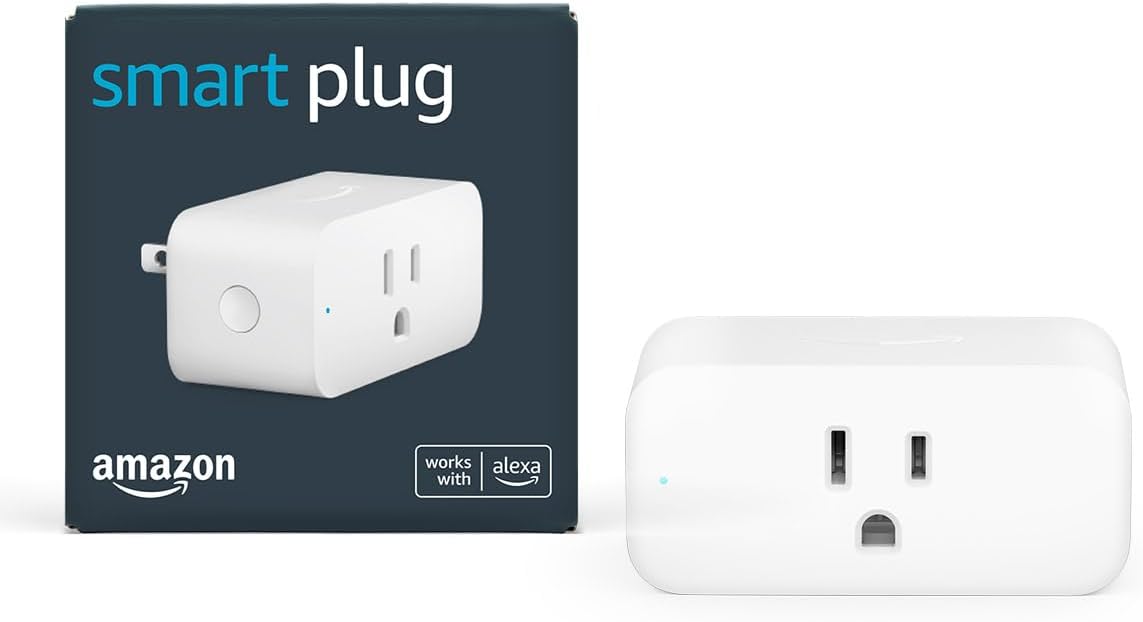
3. Amazon Smart Plug — Best For Echo-Only Households
Buy: Amazon Smart Plug on Amazon
If you have one or more Echo devices and you do not care about Apple or Google integration, the Amazon Smart Plug is the lowest-friction option in the whole category.
- No separate app required — Alexa app discovers and controls it
- Setup time: under 60 seconds for an existing Echo household
- Reliable — when Amazon makes hardware specifically for their own ecosystem, it generally works without glitches
What to know: Alexa-only. Does not work with Google Home or HomeKit. Amazon occasionally runs sales that drop these to $5-7 around Prime Day and Black Friday.
Best for: all-Alexa households who want the simplest possible smart plug experience.
4. Philips Hue Smart Plug — Best For Landlord WiFi Rules

Buy: Philips Hue Smart Plug on Amazon
This is the niche pick that solves a real renter problem: some apartment buildings cap how many devices you can register on the building WiFi, and others charge per-device fees on managed networks. The Philips Hue Smart Plug runs on Bluetooth (close-range control) or through the Hue Bridge (Zigbee mesh) — no WiFi connection required.
- Bluetooth-only mode for solo plugs you control from your phone within range
- Hue Bridge mode for full schedule + voice control without touching the building WiFi
- Premium build quality — Philips makes lighting hardware for a living
- Integrates with the rest of the Hue ecosystem if you already own Hue bulbs
What to know: expensive at about $40 each, vs $7-13 for the WiFi-based picks above. Bluetooth-only mode has limited range (~30 feet). Hue Bridge required for full features adds $50 one-time.
Best for: renters in buildings with strict WiFi rules, or Hue ecosystem households expanding beyond bulbs.
5. Meross Smart Plug Mini — Best For Tightest Outlet Space

Buy: Meross Smart Plug Mini 4-pack on Amazon
The Meross Mini is one of the slimmest WiFi smart plugs on the market — designed not to block the adjacent outlet on a duplex wall plate. If your apartment has tight outlet real estate (behind furniture, over the kitchen counter, or in a power-strip stack), this is the plug that fits where others do not.
- Slim profile — about 1.5 inches wide, slimmer than most competitors
- Cheap — under $8 each in a 4-pack
- HomeKit-compatible without a separate hub
- Works with Alexa, Google Home, SmartThings
What to know: the Meross app is functional but not as polished as Kasa. No energy monitoring on this entry-level model.
Best for: apartments with limited outlet space, kitchen counter setups, or anyone using power strips.
How to choose: the renter buyer guide
1. Which voice assistant do you actually use?
If you only have Echo devices → Amazon Smart Plug is the easiest entry point.
If you have Apple devices → look for Matter or HomeKit support: Kasa KP125M, Meross Mini, Philips Hue.
If you have a mix → Kasa Mini KP125M for the broadest cross-platform play.
If you have nothing yet → Wyze Plug because it works with everything later.
2. What does your wall outlet look like?
Standard duplex outlet → almost any smart plug works.
Outlet behind furniture or kitchen counter → slim plugs only: Meross Mini, Kasa Mini, Wyze.
Two-prong (no ground) → none of the WiFi plugs above will work. You will need a grounded outlet adapter or move to Bluetooth-only Philips Hue.
3. Is your building network locked down?
If you are in student housing, a managed WiFi building, or a serviced apartment with limits → Philips Hue Smart Plug with Bluetooth or Hue Bridge avoids the building WiFi entirely.
4. Do you care about energy monitoring?
If you pay your own electric bill and want to spot energy hogs → Wyze Plug has energy monitoring at $7. If your rent includes utilities, energy monitoring is a nice-to-have, not a need.
5. How long do you plan to stay in this apartment?
Less than 6 months → cheap and simple wins. Wyze 4-pack at $28 total covers most of an apartment.
A year or more → invest in the platform you will keep using. Kasa or Hue if you are building a long-term smart home setup.
Setup: what to expect
Every smart plug above follows roughly the same setup flow. Budget 5-10 minutes per plug for the first one, then 2-3 minutes per additional plug.
- Plug it into the wall. It will blink (usually blue or amber) to indicate "ready to pair."
- Open the manufacturer app on your phone.
- Add device. The app scans for the plug over your local WiFi.
- Connect to your home WiFi. Most smart plugs require a 2.4 GHz network. If your router is 5 GHz only, you may need to enable a 2.4 GHz band temporarily for setup.
- Name the plug ("Bedroom Lamp", "Coffee Maker", etc.).
- Optional: link to Alexa, Google, or HomeKit for voice control.
Common gotcha: if pairing fails, factory-reset the plug (usually a 5-10 second hold on the button) and try again.
FAQ
Do smart plugs work without WiFi?
Most smart plugs require WiFi for full features. The exceptions: Philips Hue Smart Plug (Bluetooth + Zigbee via Hue Bridge), Lutron Caseta plugs, and a few enterprise Z-Wave plugs that need a dedicated hub.
Will smart plugs spike my electric bill?
No. The plug itself draws under 1 watt when idle — about 9 kWh per year, which is roughly $1.10 on most US electric bills. The whole point of a smart plug is often to reduce phantom power draw from devices left plugged in.
Are smart plugs safe to use on space heaters or A/C units?
Read the smart plug amperage rating before plugging in high-draw appliances. Most smart plugs are rated for 10A or 15A. A 1500W space heater pulls about 12.5A — within range for a 15A plug, but at the edge.
Can I take my smart plugs with me when I move?
Yes. That is the whole point of plug-in smart switches. Just unplug, pack, plug into the new wall, and re-pair to the new WiFi network in the app.
Bottom line
For most renters, the Wyze Plug is the right starting point — cheap, slim, energy monitoring, works with everything. Buy a 4-pack, scatter them around your apartment, and you have got smart-home automation for under $30 total.
If you have specific constraints (Echo-only ecosystem, locked-down building WiFi, or extra-tight outlet space), the four other picks above each solve a real problem the Wyze does not.
Whatever you pick, you can take them with you when your lease ends. That is the renter superpower of smart plugs vs. smart switches: they go where you go.