Best Indoor Smart Camera Under $40 in 2026: 5 Picks That Actually Work
Five indoor security cameras under $40 that we'd actually trust to watch our living room. Wyze Cam v4, Blink Mini, Tapo C100, Kasa KC100, and Eufy Indoor Cam picks for 2026.
Affiliate disclosure: As an Amazon Associate, Easy Smart Home HQ earns from qualifying purchases. We only recommend cameras we would actually point at our own living room.
Quick answer: Under $40, the best indoor camera is the Wyze Cam v4 (~$36). 2.5K HD, color night vision, person/pet detection, works with Alexa and Google Home, optional local storage on a microSD card.
If you want the cheapest reliable pick, get the Blink Mini (~$30). Plugs into any USB outlet, works with Alexa, no microSD slot but optional cloud storage.
If you want local storage with no subscription, the TP-Link Tapo C100 (~$25) is the cheapest option that records to a microSD card with no monthly fee.
What "under $40" actually buys you in 2026
Indoor smart cameras have come down dramatically in price over the last 3 years. Under $40 today gets you features that used to cost $100+:
- 1080p or 2K video — sharp enough to ID faces and read text on packages
- Color night vision OR infrared — depending on the pick
- Two-way audio — talk to whoever is in your space (kid, pet, intruder)
- Motion alerts with basic person/pet/package detection
- Cloud or local storage options (most have both)
- Voice assistant integration — Alexa and Google Home support
What you do NOT get under $40: 4K video, advanced AI detection, professional-grade compression, or 24/7 continuous recording without a subscription.
At a glance: 5 best indoor cameras under $40 in 2026
| Camera | Best for | Price | Resolution | Local storage |
|---|---|---|---|---|
| Wyze Cam v4 | Best overall | ~$36 | 2.5K HD | microSD up to 256GB |
| Blink Mini | Cheapest plug-and-play | ~$30 | 1080p HD | USB drive (with Sync Module) |
| TP-Link Tapo C100 | No subscription | ~$25 | 1080p HD | microSD up to 128GB |
| Kasa KC100 | Reliable Alexa pick | ~$35 | 1080p HD | microSD up to 128GB |
| Eufy Indoor Cam C220 | Privacy-first | ~$40 | 2K HD | microSD up to 128GB |
Detailed picks
1. Wyze Cam v4 — Best Overall Under $40

Wyze keeps making the most camera for the least money. The v4 is the latest iteration — sharper sensor, better low-light performance, slightly larger body than the older Cam v3.
- 2.5K HD video — sharper than most $50 competitors
- Color night vision using starlight sensor (most competitors are B&W at night)
- Two-way audio with reasonable mic quality
- microSD slot supports up to 256GB for local recording
- Works with Alexa, Google Home for live view on Echo Show / Nest Hub
- Person, pet, and package detection via Wyze Cam Plus subscription ($3/mo)
What to know: Wyze had a 2023 security incident that included some camera footage exposure. They have rebuilt their security infrastructure since but the history is worth knowing if you are privacy-sensitive — the picks below (Eufy especially) have cleaner privacy track records.
Best for: people who want the best camera for the least money and trust Wyze's post-incident security improvements.
2. Blink Mini — Cheapest Plug-And-Play

Buy: Blink Mini on Amazon
Owned by Amazon. The Blink Mini is the cheapest indoor camera that does not feel cheap — small footprint, USB-powered, integrates seamlessly with Alexa.
- 1080p HD video
- USB-powered — plug into any USB outlet, no separate charger needed
- Works with Alexa for live view on Echo Show or voice commands
- Free 30-second event clips in the Blink app (no subscription required)
- Two-way audio
What to know: no microSD slot. For local storage you need the optional Blink Sync Module 2 (~$30) plus a USB drive — adds cost. Cloud storage requires Blink Subscription ($3/mo). Without storage you only get live view + recent alerts.
Best for: Alexa households who want a tiny camera that just plugs in.
3. TP-Link Tapo C100 — Best Under $30

Buy: TP-Link Tapo C100 on Amazon
The Tapo C100 is the cheapest reliable indoor camera that includes a microSD slot for local storage with no subscription.
- 1080p HD video
- microSD slot up to 128GB for continuous local recording
- Two-way audio with motion-triggered sound and light alarm
- Works with Alexa and Google Home
- No subscription required for full features
What to know: night vision is infrared (B&W) only, not color. The Tapo app is functional but less polished than Wyze.
Best for: people who want a no-subscription camera under $25.
4. Kasa KC100 — Reliable Alexa Pick

Buy: Kasa KC100 on Amazon
Kasa is TP-Link's premium sub-brand. The KC100 is more polished than the Tapo C100 with similar specs and a slightly better app experience.
- 1080p HD video with HDR
- microSD slot up to 128GB
- Two-way audio
- Better app polish than Tapo equivalents
- Works with Alexa and Google Home
What to know: a few dollars more than the Tapo C100 for app polish only — the hardware is similar. Skip if you don't care about app aesthetics.
Best for: people who want a reliable, low-friction Alexa-integrated camera.
5. Eufy Indoor Cam C220 — Best Privacy-First Pick
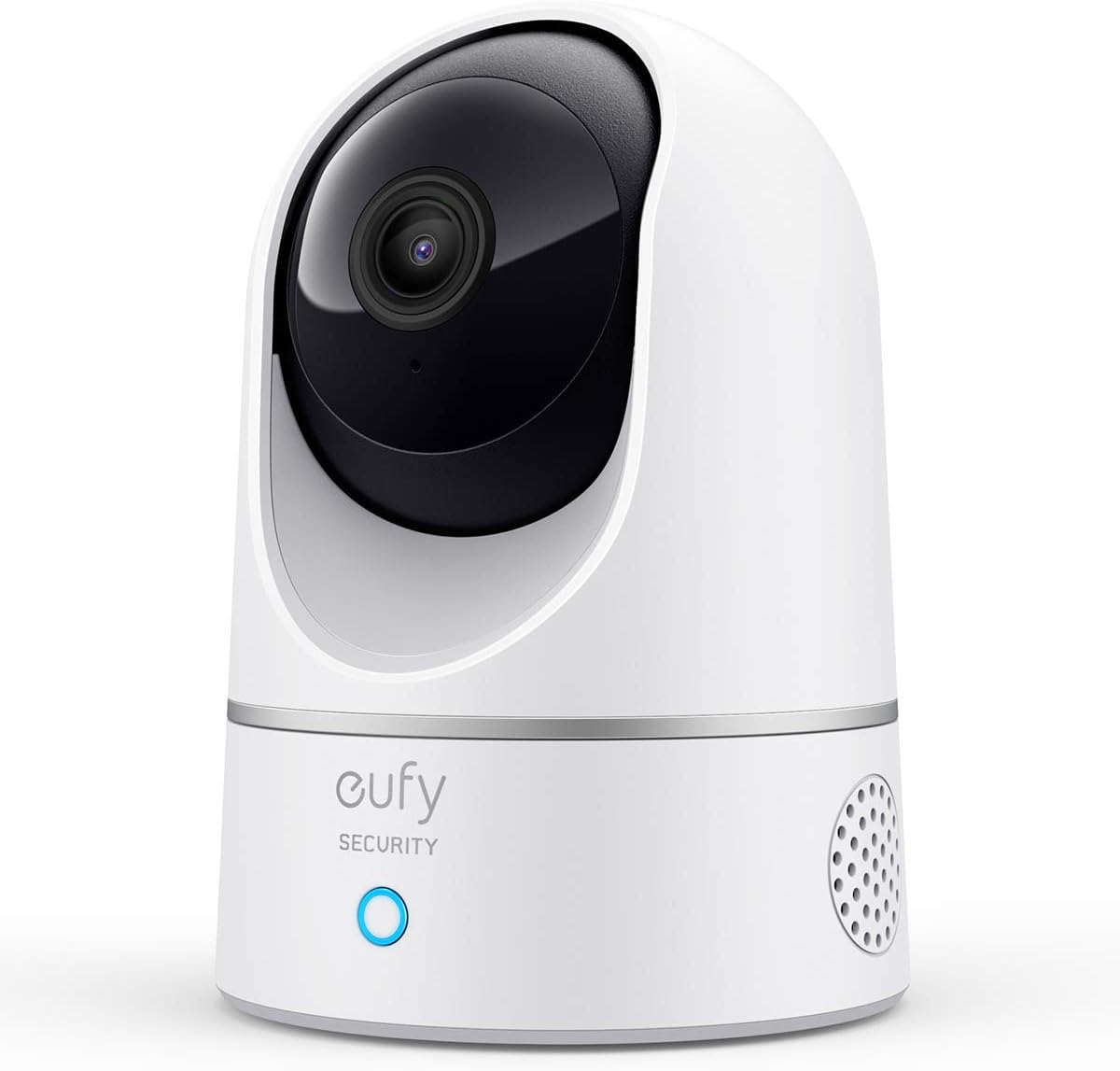
Buy: Eufy Indoor Cam C220 on Amazon
Eufy positions itself as the privacy-first alternative to Wyze and Ring. The Indoor Cam C220 stores video locally on a microSD card with no required cloud upload.
- 2K HD video
- microSD slot up to 128GB for local storage
- AI human detection reduces false alerts
- Pan and tilt motorized base — controllable via app
- Works with Alexa and Google Home
What to know: Eufy had a 2022 incident where some cloud-related streams were less private than marketed. They have since clarified their privacy policies and added end-to-end encryption for cloud features. Local-only mode (the default) is unaffected.
Best for: privacy-conscious users who want local storage with no required cloud upload.
How to choose
1. Where will you put it?
Plugged into a wall outlet near eye level → any pick works.
Tucked into a corner or shelf → Blink Mini (smallest footprint) or Wyze Cam v4 (also small).
On a high shelf with a wide room → Eufy Indoor Cam C220 with pan/tilt for full coverage.
2. What are you watching for?
Pets while you're at work → Wyze Cam v4 with Cam Plus for AI pet detection.
Front entryway from inside → any pick works.
Sleeping baby or kid → look at dedicated baby monitors instead — they have features like crying detection.
Package thieves → also consider a video doorbell (see our video doorbell guide).
3. Subscription or no subscription?
If you don't want monthly fees → Tapo C100 or Kasa KC100 with a microSD card. Local storage covers continuous recording.
If you want cloud-stored events for safety → Wyze with Cam Plus ($3/mo) is the cheapest cloud-option pick.
4. Privacy concern level?
Mainstream → any pick works.
Skeptical of cloud cameras → Eufy with local-only mode, or Tapo with microSD-only configuration.
Setup walkthrough (similar for all 5 picks)
- Plug the camera into a USB outlet or wall adapter. Most include a USB-A cable + wall adapter.
- Download the manufacturer app (Wyze, Blink, Tapo, Kasa, or Eufy).
- Create an account with the manufacturer.
- Tap "Add Device" and follow the in-app pairing flow. Most use a QR code that the camera scans from your phone screen.
- Connect to your home WiFi. Most cameras need 2.4 GHz networks.
- Set up a name and motion zones (e.g., "Living Room," and exclude the area around your TV to avoid false motion alerts from the screen).
- Insert microSD card if applicable, format from within the app.
- Optional: link to Alexa or Google Home for voice control and Echo Show / Nest Hub live view.
FAQ
Can these cameras record continuously, or only motion events?
With a microSD card installed, all picks except Blink Mini can record continuously (24/7) to the SD card. Blink requires the optional Sync Module 2 + USB drive for continuous recording. Cloud subscriptions only store motion events, not continuous footage, on most picks.
Do I need a separate camera for each room?
Yes. Each camera covers one room/area. Most apartments work fine with 1-2 indoor cameras (usually entryway + main living area). More than that gets into "what are you actually trying to monitor" territory.
Will the camera record me when I'm home?
Most cameras have a "home/away" mode that disables recording when your phone is detected on the home WiFi. You can also manually toggle the camera off when you don't want it watching. Some picks (Eufy especially) have physical privacy shutters that close over the lens.
Are these legal in shared apartments?
Generally yes for spaces you control (your bedroom, your living room). Do not point cameras at shared bathrooms, hallways, or roommate-only spaces. If you have roommates, disclose any cameras in shared common areas.
How long does motion footage stay available?
microSD storage is FIFO — once the card is full, oldest footage gets overwritten. A 128GB card with 1080p recording stores roughly 7-14 days of continuous video. Cloud subscriptions vary: Wyze Cam Plus is 14 days, Blink Subscription is 60 days.
One more thing: secure the network the camera lives on
Every camera on this page is a small computer with a microphone and a lens, sitting on your home WiFi. That makes the network itself part of the security picture — a camera is only as private as the connection it's transmitting over.
Two practical steps:
- Put smart-home devices on their own WiFi network. Most routers from the last 3-4 years support a separate "guest" or "IoT" network. Drop the cameras (and any other smart devices) on that network, keep your phone and laptop on the main one. If a camera ever gets compromised, the attacker doesn't get a path to your personal stuff.
- Use a VPN on the devices that view the camera feeds. If you check your camera feeds from a phone or laptop while on coffee-shop WiFi, hotel WiFi, or any network you don't control, run a VPN. The cheapest reliable pick is NordVPN — covers up to 10 devices on one plan, has one-tap connect on phones, and at the 2-year price runs about $3-4/month. Cameras themselves stay on home WiFi; the viewing app on your phone is what gets encrypted.
That's it. Most people skip both steps and most of the time it doesn't matter — but if you keep a camera pointed at a kid's room or any other space where a leak would actually hurt, these are the two low-effort layers worth adding.
Bottom line
For most people the Wyze Cam v4 is the right indoor camera under $40 — best video quality, color night vision, microSD support, broad ecosystem support.
If you want to spend the least possible, the TP-Link Tapo C100 at $25 is the cheapest reliable pick with local storage.
If privacy is your top priority, the Eufy Indoor Cam C220 with local-only storage is the cleanest pick.
For exterior security, see our video doorbell guide for renters.