Best Video Doorbell For Renters in 2026: 5 Picks With No Wiring Required
Five video doorbells you can install in a rental without a screwdriver or your landlord's permission. Battery-powered, removable, and renter-deposit-safe picks for 2026.
Affiliate disclosure: As an Amazon Associate, Easy Smart Home HQ earns from qualifying purchases. We only recommend products we would mount on our own apartment door.
Quick answer: If you rent and want a video doorbell that installs without holes, wires, or landlord approval, get the Ring Battery Doorbell Plus ($150). Battery-powered, mounts with adhesive or two screws, comes off cleanly when you move, free local recording with a Ring Subscription.
If you want the cheapest reliable pick, get the Blink Video Doorbell (~$60). Two AA batteries, sticks on with the included mount, no monthly fee required for basic features.
If you do not want a monthly subscription at all, get the Eufy Security Video Doorbell C210 (~$100). Local storage on the device, no cloud, no recurring fee.
Why renters need a different doorbell list
Most "best video doorbell" articles assume you own your home and can wire into existing doorbell wiring or drill new mounting holes. Renters cannot do either — at least not without risking your security deposit.
The picks below were selected with these renter realities in mind:
- No drilling required. Adhesive mounts only, or screws into pre-existing doorbell-sized holes from previous tenants.
- Battery-powered. No need to wire into your apartment electrical. Battery life ranges from 3-12 months per charge.
- Move-out clean. Adhesive mounts come off without leaving residue (with proper removal). The doorbell itself goes with you.
- Optional cellular or hotspot fallback. If your apartment WiFi is iffy, some picks support cellular plans.
- Disable for management visits. All picks let you turn off recording when maintenance is in your hallway.
At a glance: 5 best video doorbells for renters in 2026
| Doorbell | Best for | Price | Battery life | Subscription required? |
|---|---|---|---|---|
| Ring Battery Doorbell Plus | Best overall | ~$150 | 6-12 months | Recommended ($4/mo) |
| Blink Video Doorbell | Cheapest pick | ~$60 | 2 years (AA batteries) | No (basic features) |
| Eufy Security Doorbell C210 | No subscription | ~$100 | 4-6 months | No (local storage) |
| Google Nest Doorbell (Battery) | Google Home households | ~$180 | 1-3 months | Optional ($8/mo) |
| Wyze Video Doorbell v2 | Budget Alexa users | ~$60 | 4-6 months | Optional ($3/mo) |
Detailed picks
1. Ring Battery Doorbell Plus — Best Overall For Renters

Buy: Ring Battery Doorbell Plus on Amazon
Ring is the gold standard for residential video doorbells. The Battery Doorbell Plus is the renter version — fully wireless, removable mount, no electrician required.
- 1536p HD video with head-to-toe view (rare in this price range)
- Color night vision — most picks have black-and-white night mode only
- 6-12 months battery life on a single charge
- Adhesive mount included — no drilling for hard installs
- Works with Alexa for voice notifications and chimes
What to know: Ring Subscription ($4/mo) unlocks 60-day video history, person/package detection, and pre-roll. Without subscription you only get live view + last few motion alerts. The basic free tier is enough for casual security but most users add the $4/mo plan.
Best for: renters who want the best video quality and most reliable detection.
2. Blink Video Doorbell — Cheapest Reliable Pick

Buy: Blink Video Doorbell on Amazon
Blink is owned by Amazon. The Blink Video Doorbell is the cheapest doorbell that does not feel cheap — battery powered, AA-replaceable, and works with the Alexa ecosystem.
- 1080p HD video
- Two AA batteries last about 2 years (no charging required, just swap batteries)
- Free live view + 30-second event clips via the Blink app
- Works with Alexa for voice alerts and live view on Echo Show
What to know: cloud storage requires Blink Subscription ($3/mo) or you can use the optional Blink Sync Module 2 with a USB drive for local storage (~$30 one-time). Without storage you only get live view + recent alerts.
Best for: renters who want a basic doorbell under $75 and do not want monthly fees.
3. Eufy Security Doorbell C210 — Best No-Subscription Pick

Buy: Eufy Security Doorbell C210 on Amazon
Eufy stores video locally on the doorbell itself — no cloud, no subscription, no monthly fee. If you do not want recurring costs, this is the cleanest pick.
- 2K HD video — sharper than most $100 doorbells
- Local storage on the device — about 8GB built in (~30 days of motion clips)
- 4-6 months battery life per charge
- AI human detection reduces false alerts from cars and animals
- Works with Alexa and Google Home
What to know: Eufy had a 2022 incident where some cloud-related streams were less private than marketed. They have since clarified their privacy policies and added end-to-end encryption for cloud features. Local-only mode (which is the default for the C210) is unaffected.
Best for: privacy-conscious renters who do not want any recurring subscription.
4. Google Nest Doorbell (Battery) — Best For Google Home Households
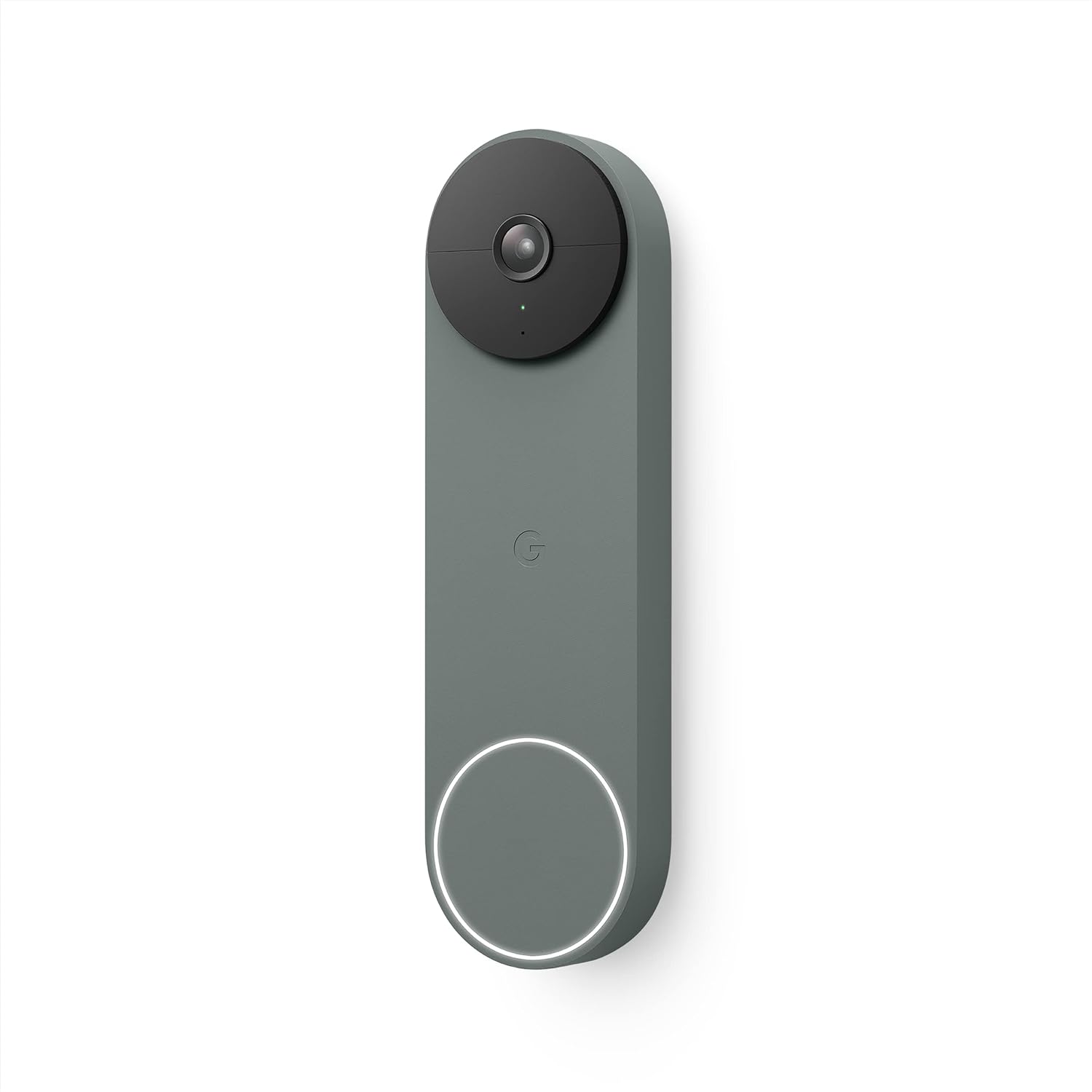
Buy: Google Nest Doorbell Battery on Amazon
If you have Google Nest Hubs or Google Home devices, the Nest Doorbell integrates more deeply than any third-party option.
- 1080p HD video with HDR
- 3 hours of free event history without subscription
- Smart alerts distinguish people, packages, animals, vehicles
- Works seamlessly with Nest Hub displays for live view
What to know: battery life is shorter than competitors (1-3 months depending on motion frequency). Nest Aware ($8/mo) unlocks 30-day event history and continuous recording. Without it, you get the 3-hour free window only.
Best for: renters who already have Google Nest Hub devices and want one ecosystem.
5. Wyze Video Doorbell v2 — Best Budget Alexa Pick

Buy: Wyze Video Doorbell v2 on Amazon
The Wyze Video Doorbell v2 is the cheapest battery-powered doorbell with a screen-friendly Alexa integration.
- 2K HD video at this price point is rare
- 180-degree wide angle captures your entire entryway
- Person/package detection built in
- Wyze Cam Plus subscription ($3/mo) unlocks longer recording history
What to know: Wyze had a 2023 security incident. They have rebuilt their security infrastructure but the history is worth knowing. Battery installation takes about 5 minutes; the company also sells an optional wired version.
Best for: Alexa households on a tight budget.
Installation: what to expect
All five picks follow the same flow. Budget about 10-15 minutes total.
- Charge the battery (or insert AA batteries for Blink). Most ship with partial charge.
- Download the manufacturer app and create an account.
- Hold the doorbell near your phone and follow the in-app pairing flow. Each manufacturer has slightly different pairing — usually a QR code scan or button press.
- Connect to your home WiFi. Most doorbells need 2.4 GHz networks.
- Mount the doorbell. Adhesive mounts: clean the surface with rubbing alcohol, peel the backing, press for 30 seconds. Screw mounts: use the included screws if you have pre-existing holes from a previous tenant; otherwise use the adhesive.
- Test motion alerts by walking past the doorbell.
- Set up notification preferences in the app — when to get alerts, how loud, whether your Echo or Nest Hub announces visitors.
FAQ
Will the adhesive mount damage my door or wall when I move out?
If you remove it correctly, no. Most doorbell adhesive mounts use 3M VHB tape. To remove cleanly: warm the adhesive with a hair dryer for 30 seconds, then slowly pull from one corner with dental floss to slice the adhesive cleanly. Any residue can be removed with Goo Gone or rubbing alcohol.
Do these need an existing doorbell?
No. All picks are battery-powered and standalone — they do not connect to existing doorbell wiring. If your apartment has an existing wired doorbell, you can leave it intact and add a battery doorbell separately.
Will the doorbell still work if my internet goes down?
Most have a local-storage fallback — they keep recording motion events to internal storage and upload to the cloud when WiFi returns. Live view and remote alerts require internet.
Are video doorbells legal in apartments?
Generally yes, with two caveats: (1) the camera must point at your entryway, not into shared hallways or neighbor doors. (2) Some buildings have rules against any visible exterior modifications — check your lease before mounting.
How loud is the chime?
Most battery doorbells have a built-in chime in the doorbell itself plus app notifications on your phone. If you also want an in-apartment chime, several picks (Ring, Wyze) sell separate chime accessories that plug into a wall outlet.
Bottom line
For most renters, the Ring Battery Doorbell Plus is the right pick — best video quality, best detection, easiest install, best ecosystem support. The $4/month subscription is worth it if you care about video history.
If you want to spend the least possible, the Blink Video Doorbell at $60 with replaceable AA batteries is the budget winner.
If you refuse to pay any monthly fee, the Eufy Security Doorbell C210 stores everything locally with no cloud subscription.
Whichever you pick, all five come down cleanly when you move out. They go with you.
For more rental-friendly smart home picks, see our renter smart plug guide.